Teal vs. Click Hired: Which Tool Actually Does More for an Active Job Search?
on
If you're sending 10 or more applications a week, you've probably already discovered that most job search tools were designed for a much more casual pace. You clip a job, switch tabs, open a resume builder, analyze keyword gaps, manually rewrite bullets, then start over for the cover letter — and that's before you've even filed the application anywhere.
Teal is frequently recommended as the solution to this problem. It bundles a job tracker, a resume builder, and AI analysis into one account, which sounds like consolidation. The question worth asking before you commit to it — or any tool — is whether the workflow it actually creates matches the volume you're running.

A workflow comparison for active job seekers running 10 or more applications per week — covering job discovery, tailoring, cover letters, and tracking.
The Core Architecture Difference
This is the single most important thing to understand before comparing individual features.
Teal is built around a Chrome extension that clips jobs from external boards and routes them into its web app. The extension captures the job; the real work happens in a separate tab at tealhq.com. That's not a flaw — it's the product's design philosophy. You discover jobs wherever you already look, save them to Teal's kanban board, then come back to the web app to do the tailoring and analysis.
Click Hired is built as a single pipeline. You either browse matched jobs inside the platform or paste in a link from somewhere else. Either way, the resume, cover letter, and screener answers come out of one action — not spread across a browser extension plus a web app plus a separate cover letter step.
If you're running three or four applications a week, the multi-step workflow probably doesn't feel like friction. At 10 or 15, it compounds.
Job Discovery
Teal doesn't surface jobs for you. Its Chrome extension works across 40+ job boards, which is genuinely useful for capturing jobs you already found — but finding those jobs in the first place is entirely on you, done externally on LinkedIn, Indeed, or wherever you look.
Click Hired matches jobs to your profile from a pool of 250,000+ new listings scanned against your stated experience, salary goals, and location preferences. You can also bring in any external job by link. Ghost job filtering happens before listings reach your queue, which matters if you've ever spent time tailoring an application to a role that had already been filled.
For a high-volume searcher, the practical difference is whether you want to spend time sourcing jobs before the tailoring work even starts, or whether you'd rather have a curated queue waiting.
Resume Tailoring
This is where the workflow gap is most pronounced.
Teal's approach: Save job via extension → open web app → link a saved resume to the job → run Analyze & Compare → read the keyword gap report → manually edit your resume in Teal's editor, or use AI bullet rewrites to assist. The match analysis and AI rewrites are both gated behind Teal+ (starting at $29/month). You are doing the editing; the tool surfaces what to edit.
Click Hired's approach: Paste a job link or select a matched listing → receive a tailored resume built from your real experience in approximately 30 seconds → review and approve before applying. The platform claims a 98% ATS pass rate on generated resumes, though this figure is self-reported and hasn't been independently audited. Keyword-match scoring is shown before you generate, so you can see fit before committing an application.
The meaningful distinction: Teal identifies the gap and leaves the rewrite to you. Click Hired generates the rewrite and leaves the review to you. At volume, those are very different time costs.
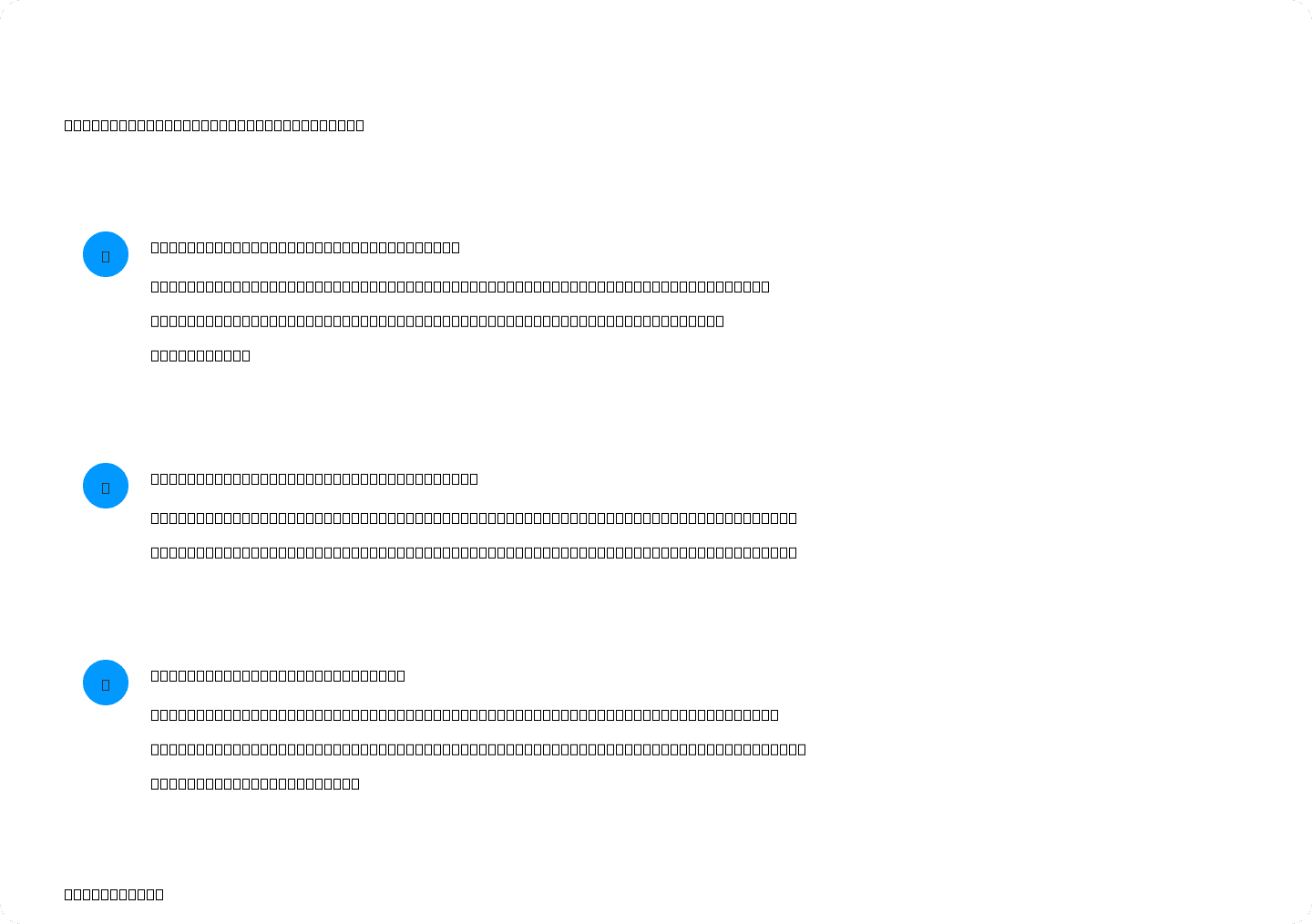
Teal requires several context switches between its Chrome extension and web app before an application is ready. Click Hired compresses the same work into one review step.
Cover Letters
Teal's free tier includes a lifetime cap of two AI-generated cover letters — not two per month, two ever. On Teal+, cover letter generation is unlocked, but it's a separate action from resume tailoring, not a simultaneous output.
Click Hired generates the resume, cover letter, and screener answers together in one pass. If you're applying to 12 roles in a week and every one needs a tailored letter — which the data does support, given that tailored letters outperform generic ones significantly in callback rates — a tool that requires a separate generation step for each is adding overhead that multiplies across the week.
A note on tailored cover letters: a controlled field experiment across 7,287 real applications found tailored letters produced a 16.4% callback rate versus 10.7% for no letter at all — a 53% lift. At high volume, skipping the cover letter step to save time has a measurable cost.
Application Tracking
This is where Teal's edge is clearest and most honest. Its kanban-style tracker — Saved, Applied, Interviewing, Offer — is consistently rated as the strongest part of the product in independent reviews. Unlimited job tracking is available on the free tier, which is a real differentiator: you can use Teal purely as an organizer without paying anything.
Click Hired's tracking covers jobs, document versions, statuses, and follow-up reminders in one dashboard alongside your application documents. The Professional plan adds calendar features and tasks. The meaningful point is that your tracked applications and your tailored documents are co-located — you're not managing one kanban board in one app while your resumes live in another.
If your current problem is organization and you're comfortable piecing together your own tailoring workflow, Teal's free tracker might be all you need. If your problem is throughput — getting more complete applications out the door per hour — that's a different problem that the tracker alone doesn't solve.
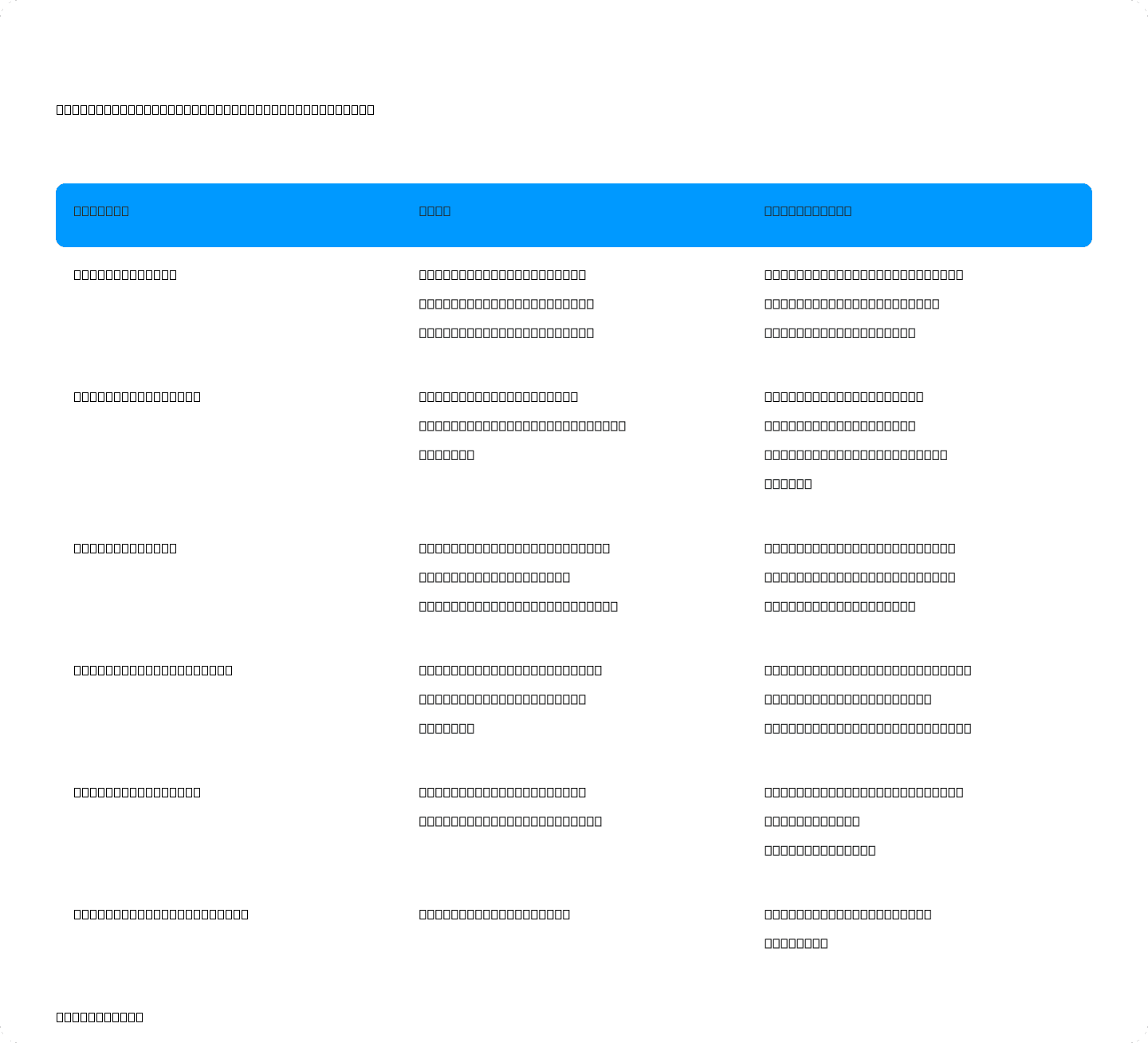
Key differences across the five areas that matter most for an active, high-volume job search. Pricing should be verified at each vendor's site before purchase.
Pricing: The Weekly Rate Trap
Teal's pricing has one specific feature worth flagging before you sign up.
Teal+ is available at $13/week, $29/month, or $79/quarter. There is no annual plan. The weekly tier looks cheap at entry, but four renewals in a month reaches roughly $52–$56 — and it's documented that the rate rose from $9 to $13/week between April and October 2025 without a clear public announcement. Multiple reviewers flag the weekly plan as a billing trap. Use the monthly rate if you're committing to Teal.
Click Hired's Essentials plan starts at $6.99/month and covers five complete tailored applications and 80 job searches. The Professional plan is $24.99/month for 35 tailored applications and 400 searches. A 7-day free trial requires a card. Verify current pricing at clickhired.ai before committing.
Which One Is Actually Built for 10+ Applications a Week?
The honest answer depends on which part of the workflow is your actual bottleneck.
Teal is the right choice if: Your primary need is organization. You're already comfortable tailoring resumes manually or through another tool, you want a free kanban board for tracking, and the multi-step process of clipping → analyzing → editing feels like an acceptable tradeoff for free access to a solid tracker.
Click Hired is the right choice if: Your bottleneck is throughput. You want job discovery, tailoring, cover letters, and tracking to happen in one place, and you're running enough applications that compressing five steps into one review-and-approve cycle saves meaningful time across the week.
The step-count difference between the two workflows — extension clip to web app to keyword analysis to manual edits to separate cover letter generation — is real and it compounds at volume. Whether that compounding matters depends entirely on how many applications you're actually sending.
If you're ready to see how Click Hired handles a real job in your queue, you can start a 7-day free trial at clickhired.ai and run a single application end-to-end before deciding.

CLICK HIRED · YOUR NEXT MOVE
Turn that job link into a tailored resume and cover letter with Click Hired. Built from your experience. Ready for your review.
7-day free trial